
Wingdings translator is the tool you were looking for to type your text in Wingdings. See how funny it is to create your messages in this symbol font instantaneously. In this article, you will also learn a lot about Wingdings by exploring the following subjects:
- What is Wingdings?
- What is the purpose of the Wingdings symbol font?
- Dingbat fonts beyond Wingdings;
- Wingdings translator — Example;
- Is Wingdings a real language?
- How can I write HELLO in Wingdings?
- How can I type a star in Wingdings?
- Why did Wingdings become popular?
- And much more.
So, come together with us in this journey full of 💧✡💣👌⚐☹💧.
🙋 You can find other interesting tools to modify your text messages by accessing our gothic font generator, vaporwave text generator, mirror text generator, and cursive font generator.
What is Wingdings?
Wingdings is a symbol font designed by Charles Bigelow and Kris Holmes that replaces letters with various symbols. This type of font is known as dingbat, and its symbols are shown in the figure below.
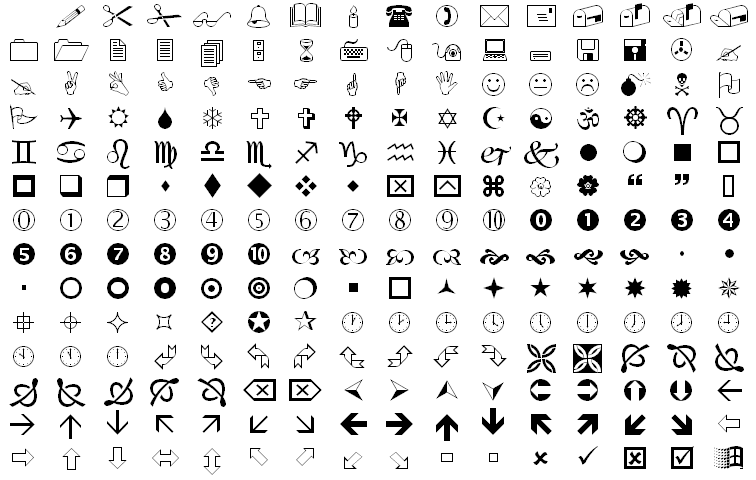
Microsoft designed Wingdings around 1990 and released it as one of the fonts presented in Windows 3.1 (1992). Nowadays, you can still find this font in Microsoft Office and on webpages, such as our Wingdings translator.
There are three different types of Wingdings font: the first dingbat, Wingdings 2, and Wingdings 3. The idea behind these three fonts was to have different sets of symbols that you could easily use in documents and slide presentations. In the next figures, you can see the set of symbols of Wingdings 2 and 3.
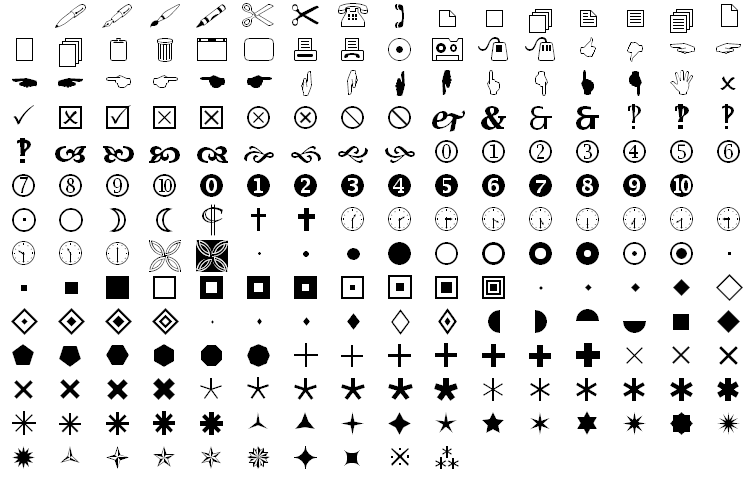
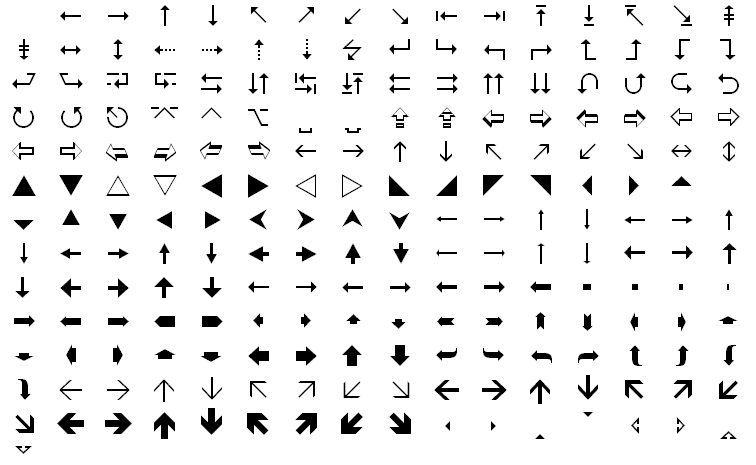
We still do not have a complete mapping of these fonts to Unicode — the encoding that supports text across all the world’s digital writing systems. However, many Wingdings symbols have been added to Unicode since version 7.0.
What is the purpose of the Wingdings font?
Before the era of emojis, you can imagine how hard it would be to insert a high-quality image or symbol in your text or slide. This was the purpose of dingbat fonts such as Wingdings.
Wingdings gave users a way to include graphical icons, such as arrows, stars, mail envelopes, smiles, and clocks, directly within text editors like Microsoft Word. These symbols could be resized, colored, and aligned alongside text or in a PowerPoint presentation.
Dingbat fonts beyond Wingdings
Dingbat is a term historically used to describe the printer’s ornaments of a text. The dingbats could be box frames with decorative draws in a page or symbols for section dividers. The computer dingbat fonts are inspired by these ornaments and are based on symbols and shapes to represent the letters and numbers of a keyboard.
Besides Wingdings, there are other well-known dingbat fonts. From Microsoft, we can cite Wingdings 2, Wingdings 3, and Webdings. The latter was released in 1997 specifically for web developers and included several internet-related symbols, such as the home, print, and folder icons.
We can also point out ITC Zapf Dingbats, Adobe Wood Type Ornaments, Peignot Ornaments, Font Awesome, and Material Icons as other interesting examples of dingbat fonts.
🙋 Learn more about different text modifications and typography by checking out our articles:
Wingdings translator — Example
Let us show you how easy and interactive our Wingdings translator can be in rewriting your messages using symbols. You just need to type your text into the field of our translator, and you’ll see the Wingdings version in the blink of an eye.
For example, suppose we want to write “OMNI CALCULATOR”. Then, by typing the words in our translator, we get:
⚐💣☠✋ 👍✌☹👍✞☹✌❄⚐☼
Feel free to create your Wingdings text and copy and paste the translated message into your text or slide editor.
FAQs
Is Wingdings a real language?
No, Wingdings is not a real language. Microsoft introduced this font to help users insert symbols into their documents. To be a language, these symbols should have their own grammar and syntax. Therefore, Wingdings is just a font, like several others we can use in our favorite text editor, such as Calibri, Arial, Times New Roman, and Comic Sans.
How can I write HELLO in Wingdings?
You can follow the steps below to write HELLO in Wingdings:
-
Find the corresponding symbols of each letter in a Wingdings chart.
-
Substitute each letter for its corresponding symbol. In this case, we have:
H = ☟; E = ☜; L = ☹; L = ☹; O = ⚐
-
Write the translated text: ☟☜☹☹⚐.
-
Or, you can save your energy and use our Wingdings Translator.
How can I type a star in Wingdings?
There are different types of stars that you can type in Wingdings. You can see some examples and the respective keys to generate each one of them below:
- Six pointed black star ✶ = ¨ (double dot or diaeresis);
- Five pointed black star ★ = ´ (acute accent);
- Sun ☼ = R (capital letter R); and
- Star of David ✡ = Y (capital letter Y).
Why did Wingdings become popular?
Wingdings became popular in the 1990’s, when we did not have emojis and high-quality images. It was available in different versions of Windows since 3.1, and also in Office. The popularity of Windows spread Wingdings quickly among its users. Nowadays, Wingdings and other dingbat fonts are still used for design in text editors and on webpages, and several of their symbols have been incorporated into Unicode.