
The mirror text generator is the tool that you were looking for to write your messages in a mirror. In fact, mastering this writing process can be more challenging than you imagine. You can start your journey to easily write like Leonardo da Vinci with our mirror text converter.
Stay with this article to see the following topics in detail:
- What is mirror writing? Why should I mirror text?
- How do I mirror text without a mirror text generator?
- The mirror text generator — Plus example.
- How do I mirror text in Word?
- Can I mirror text messages in WhatsApp?
- How do I write the word “ambulance” in mirror writing?
- How can I read mirror writing?
- And much more.
So, let’s start to write your messages in a ɿoɿɿim.
🙋 If you are looking for more text converter tools, you can access our small caps calculator and title case calculator.
What is mirror writing? Why should I mirror a text?
.ɘϱɒυϱnɒl nɘviϱ ɒ ʇo noiɈɔɘɿib lɒɿυɈɒn ɘʜɈ ϱniƨɿɘvɘɿ ʇo ƨɈƨiƨnoɔ ϱniɈiɿw ɿoɿɿiM
Wait, what is it? Well, this is the definition of mirror writing. The phrase in the natural direction is: Mirror writing consists of reversing the natural direction of a given language. Mirror writing is also considered a primitive method of encoding a message to casual readers. The funny thing about it is that your message will look normal when you see it reflected in a mirror. For another way to encode text, try our leet speak calculator. To visually flip your writing, try our upside-down text calculator.
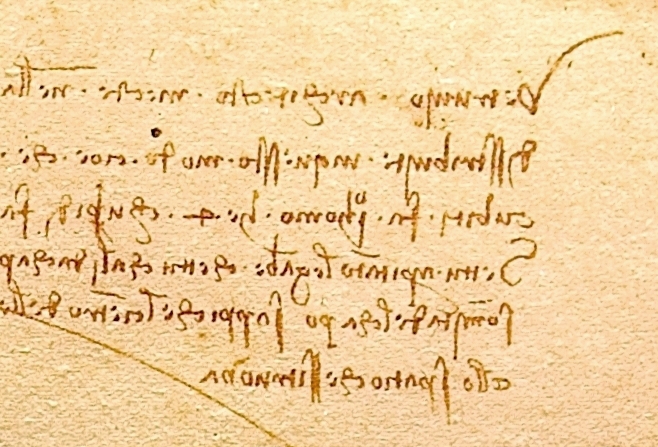
The most notorious person to use the mirror writing technique was Leonardo Da Vinci. His notebooks are full of notes in mirror writing, as you can see in the figure below. Some of them were observations about science, anatomy, and engineering, some were jokes or daily life notes, and others were interesting questions, such as: how does a woodpecker’s tongue work?
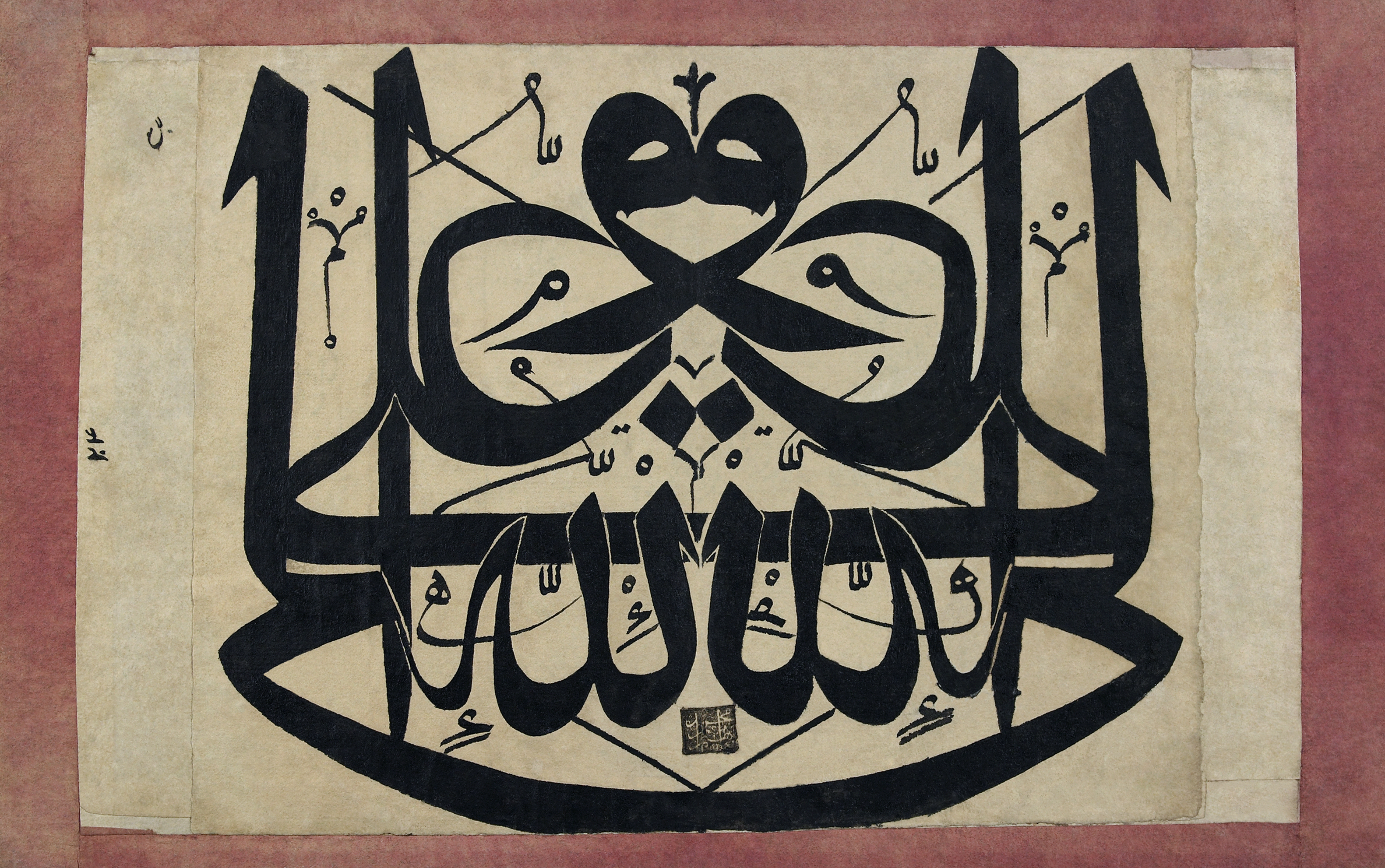
This type of calligraphy was also popular in the Ottoman Empire, usually applied to write sacred messages, just as the one shown in the following figure, where we can see the phrase Ali is the vicegerent of God written in both directions.
Nowadays, neuroscientists are connecting mirror writing with symptoms of Parkinson's disease or spinocerebellar degeneration. This investigation is based on the changes that such a disease makes to the neural mechanism responsible for controlling cerebral function in writing.
How do I mirror text without a mirror text generator?
To mirror text is not an easy task, but with practice, you can master it. Basically, you need to write letters and words backward, from right to left, in such a way that they appear normal in a mirror.
You can start by reversing the order of the letters of your word or phrase. It will be easier if you start with short words, such as MOM, TAX, or FOOT. Then write from right to left, trying to keep the space between the letters. You can use graph paper to help maintain consistent spacing. After that, use a mirror to check if you can read your word properly.
However, the best option is to skip the hard work and use our amazing mirror text generator.
The mirror text converter — Example
In this section, we will show you how our mirror text generator is easy and intuitive to use.
Suppose that you want to mirror the word “omni”. Then, you just need to write this word in the text field of our calculator, and the mirror text will appear instantaneously, like magic. In this case, the mirror text is “inmo”.
Then, you can copy and paste your word into another text editor or send it as a message on your mobile.
🙋 If you want to send complex messages to your friends, access your Caesar cipher shifter and Vigenère cipher calculator.
FAQs
How do I mirror text in Word?
You can mirror a text in Word by following the steps below:
- Go to Insert, then Text Box and Draw Text Box.
- Then, right-click the box and select Format Shape.
- In the format shape panel, click in the A icon, then in Text Options and Text Effects.
- Now, expand the option 3D Rotation, and type 180° in the X Rotation to flip the text horizontally.
- You can also remove the outline and the filling of the text box for a cleaner look.
Can I mirror text messages in WhatsApp?
To mirror a text message in WhatsApp, you need to use an app or software with a mirror text generator, since WhatsApp doesn’t have a built-in mirror function. Then, copy your reversed text, paste it into the WhatsApp chat, and send it to your friends and family. Feel free to use our mirror text converter to mirror your text messages.
How do I write the word “ambulance” in mirror writing?
To write the word “ambulance” in mirror writing, follow the steps below:
- Write the plain text in the opposite direction.
- Then, start to write each letter in the reversed direction, from the right to the left.
- Try to keep the proper spacing between each letter.
- Check with a mirror if you can read the word.
- Or, you can use our mirror text converter and save your time.
How can I read mirror writing?
You can read mirror writing by simply using a mirror or by using your mobile camera and the flip/mirror option to reverse the text. If your text is written on thin paper, you can hold the paper up to a bright light, in such a way that you can read it from the back.