

The T9 to text converter is here to help you convert numbers on a phone keypad to text or tell you what numbers to press to write your text. Along with this article, you will learn several subjects related to T9 and how to use our translator properly.
Stay with us to explore the following topics:
- What is T9 predictive text? The T9 keyboard
- What is a textonym? Issues with the T9 texting method.
- When did T9 texting start?
- Does iPhone have T9 texting?
- How to text capitals with T9?
- How can I write “the” with T9?
- And much more.
So, let’s learn together how to type your message using T9.
🙋 Are you interested in other coding tools? Then check out our ASCII converter and the Caesar cipher shifter.
What is T9 predictive text? The T9 keyboard
The T9 is an example of predictive text for mobile phones. It was developed by Tegic Communications and was very popular on mobile devices during the 1990s and 2000s, as these devices still had physical input keys (or keypads) at that time. The name T9 means “Text on 9 keys”, and its objective was to make it easier to type messages with your phone.
The T9 combines groups of letters in the different numbers presented in a 3x4 keyboard, following the pattern below:
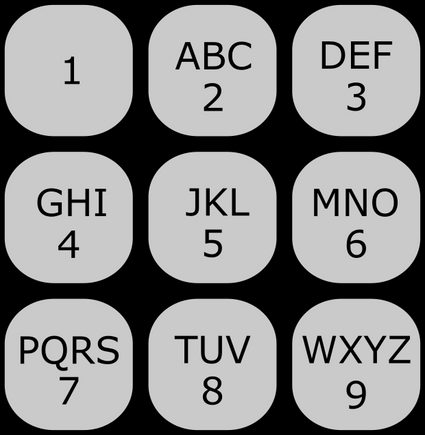
As shown above, the number is the only key without a letter, since it can represent different characters depending on the language. It could be a period, full stop, hyphen, question mark, exclamation mark, apostrophe, or even word breaking. You can learn more about the history behind the key number by reading our article titled: “Why are there no letters on the key on a mobile phone?”.
So, to type a message, the user should see the letters corresponding to each number and press it one to three or four times to type the desired letter.
The T9 texting method for writing letters cannot be as convenient as the present touch screens found in mobile phones. However, it was very efficient in its golden days, when we could combine group letters with dictionaries of words, and its algorithm could also suggest frequently used words to speed up the typing process of messages. Moreover, its later versions allowed the selection of primary and secondary languages. If you want to learn more about the concept behind predictive text, access our dedicated article: “How Does Predictive Text Work?”.
Despite the changes in mobile phone design, the T9 keyboard can still be used in present-day devices. You can download a T9 keyboard app in your mobile’s app store. After installing it, you need to enable the T9 as an on-screen keyboard. You can also set it as your default keyboard or use it in the on-screen keyboard selector.
If you are curious about the evolution of text messaging and mobile phones over the last few decades, check out the articles “The History of Text Messaging” and “The History of Mobile Phones.”
T9 to text converter example
We will show you how our T9 translator is easy and intuitive to use. Firstly, you need to select if you want to convert T9 to text or text to T9. Then, simply type your message or T9 code and see the conversion in the blink of an eye.
Let’s make an example. Suppose you want to translate “OMNI” using T9. In such a case, the T9 texting method will give you:
where the spaces between the numbers indicate a slight pause in typing, and therefore a new character.
You can see in the table below the correspondence between the numeric characters and the respective letters:
T9 | Letter |
|---|---|
666 | O |
6 | M |
66 | N |
444 | I |
Note that if you want to type a T9 sequence in our T9 to text converter using multi-tap texting (pressing the key more than one time), you need to type a sequence of numbers for your corresponding letter, and then wait one second to type the next sequence. For example, to type the word yes in our translator, you should press three times, then wait, press twice, then wait again, and press four times.
🙋 You can see other tools that convert between text and numbers by accessing our numbers to letters converter and letters to numbers converter.
What is a textonym? Issues with T9 texting method
As you can imagine, we may be able to generate two (or more) different words with the same combination of T9 numerical characters. Each of these sequences of number keys is known as a textonym. This occurs through the use of T9 predictive text when we do not account for multi-tap texting. Here are some examples of textonyms (in English):
- 4663 — good, home, gone, hood;
- 2665 — book, cool, cook, bool;
- 9673 — word, wore, yore;
- 3474 — fish, dish;
- 228 — cat, bat, act; and
- 227 — bar, car, cap.
FAQs
When did T9 texting start?
The T9 texting method was invented in 1995 by Tegic Communications and became very popular in mobile phones by the end of the 1990s. The T9 algorithm combines group letters with dictionaries of words, offering frequently used words, and its later versions had support for primary and secondary languages.
Does iPhone have T9 texting?
T9 is not used as the standard keyboard on the iPhone for texting. You can use it in the dialing function to search for contacts in your contact list. If you want to use T9 for texting on your mobile device, you can download a third-party app from the App Store and enable it as an on-screen keyboard.
How to text capitals with T9?
It depends on your mobile or keyboard configuration, but usually you press the # or * keys. But pressing the correct key multiple times, you can switch between lowercase, Uppercase, or ALL CAPS. After reaching the desired mode, you can type the letters of your T9 keyboard and write your text properly.
How can I write “the” with T9?
To write the word “the” with T9, you need to follow the steps below:
- Press the key 8 of your T9 keyboard once to write “t”.
- Press the key 4 twice to write “h”.
- Press the key 3 twice to obtain “e”.
- That’s all! You can write this word and several other ones using our amazing T9 to text converter.